


CALMEAN Control Center
3.48.00 Reviews
App Specs
- Version
- 2.91.0.1163
- Updated On
- License
- Free
- Downloads
- 100,000+
- Developer
- Protect and track what matters most with CALMEAN
- Categories
- Parenting
- Platform
- Android
Screenshots
 Analysis by AppCompare
When I judge a parental-control app, I look for more than a map or a list of blocked apps. The useful question is whether its tools help a family agree on boundaries and follow them without turning every phone check into a confrontation. CALMEAN Control Center is built around that practical mix of location awareness and device management, so it may suit parents who want several kinds of oversight in one place rather than a separate app for each concern.
Where it fits in a family’s routine
CALMEAN is a parenting app from Protect and track what matters most with CALMEAN. It is free to install, with optional in-app purchases, and is rated for Everyone. Its current version is 2.91.0.1163, and the app has been available since October 8, 2015. Its average rating is 3.4 from around 4,300 ratings, with over 100,000 installs. Those figures suggest an established product, but they do not tell me whether its approach will suit a particular household; the more important test is whether the controls match the way your family actually handles screen time and safety.
I would start by deciding what problem needs solving. If the main concern is a child’s journey home, location tools may matter more than restrictions. If arguments tend to start around games or social apps, limits and blocking may be more useful. A combined parental-control app can make those routines easier to manage from one place, but it also asks parents to think carefully about which controls they want to use and why. I would explain each rule to a child before turning it on, rather than relying on monitoring to substitute for a conversation.
Making location and limits useful, not intrusive
A realistic use case is a child walking home from school while a parent is still at work. Location information can help answer the immediate question of whether they are on their way, while a notification tied to a place may reduce the temptation to repeatedly open the app and check. That is a better use of tracking than watching a child’s movements throughout the day. I would keep location checks tied to a clear safety reason and tell the child what is being monitored; trust is harder to rebuild when tracking feels secretive.
For screen-time rules, I would avoid setting a blanket restriction before seeing how a child uses the device. A more workable routine is to identify the specific apps that interfere with homework or bedtime, then use limits or blocking for those apps rather than treating all phone use alike. If a restriction causes trouble during a legitimate activity, the parent can review the rule instead of assuming the child is trying to evade it. The practical value of controls depends on a parent revisiting them as schedules and responsibilities change.
What to weigh against simpler alternatives
Compared with using the built-in parental controls on a phone, a dedicated app such as this can be appealing when a parent wants location awareness alongside app management. The trade-off is another service to set up and maintain, and potentially paid features beyond the free download. Families who only need a bedtime limit or a basic app restriction may find the operating system’s own tools simpler. Families who want several controls gathered into a parenting-focused app may prefer CALMEAN, provided its available settings align with their needs.
Before relying on it, I would test the arrangement together: check that the child’s device is connected as intended, set one low-stakes rule, and confirm that the parent receives the alert they expect. That small trial can reveal whether notifications are helpful or too frequent and whether the chosen limit fits the family’s routine. It is also a chance to discuss what happens if a location or app rule is triggered accidentally. A tool works better when everyone understands the boundary and knows how to ask for a reasonable exception.
Worth Reading Before You Choose

EA SPORTS FC Mobile 26 Is a Bigger Football Game, but It Takes Time

Flipboard Shows What News Apps Must Do Beyond the Feed

Switching to Android Auto Means Rethinking Your Driving Routine

Google Calendar Makes a Crowded Week Easier to Manage

Ludo King Makes the Most of the Minutes Between Plans

Baby Panda World Brings Quick Play to Modern Phones, but Its Game Library Feels Busy
Easy Setup and User-Friendly Design
First things first, setting up the CALMEAN Control Center was a breeze. The app walks you through the process step-by-step, making it easy even if you're not particularly tech-savvy. Once everything was up and running, I was greeted by a clean and intuitive interface that laid out all the features in a way that made sense. No overwhelming menus or confusing jargon, just straightforward controls.
Comprehensive Monitoring Features
Now, onto the meat of the app: its monitoring capabilities. From tracking location to managing app usage, CALMEAN Control Center offers a suite of features that cater to various parenting needs.
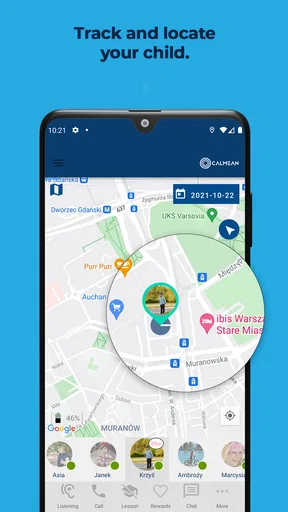
- Location Tracking: This feature lets you see where your kids are in real-time. It's handy for peace of mind when they're out and about.
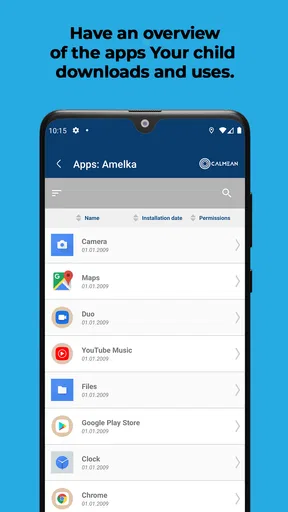
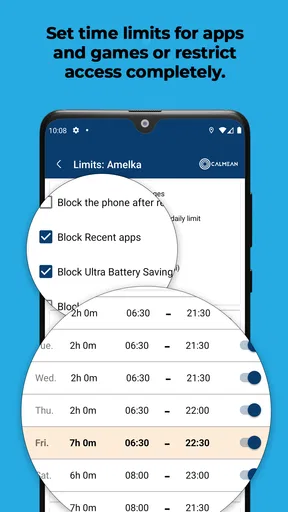
- App Usage Management: You can set time limits on apps or block them entirely. No more sneaky late-night gaming sessions!
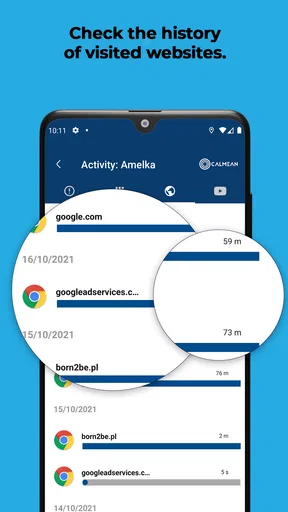
- Internet Filtering: The app allows you to filter out inappropriate content, ensuring a safer browsing experience for the young ones.
- Communication Monitoring: Keep tabs on who your kids are talking to and what they're discussing. It's a great way to ensure their interactions are healthy.
Customizable Alerts and Notifications
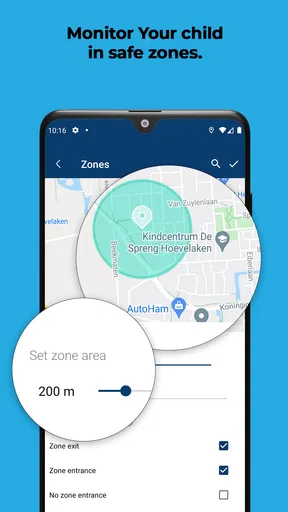
One of my favorite aspects of CALMEAN Control Center is the customizable alerts. You can set up notifications for specific activities, like when your child arrives at a particular location or tries to access a restricted app. These alerts are timely and help you stay informed without having to constantly check the app.
Privacy and Security
Security is a big deal, especially when dealing with your family's data. The app employs robust encryption methods to ensure your information stays private. Plus, CALMEAN Control Center is transparent about its data policies, which is always a plus in my book.
Support and Community
If you ever run into issues, the app offers a comprehensive support section with FAQs and troubleshooting guides. There's also a community forum where you can connect with other users, share experiences, and get tips.
Overall, my experience with CALMEAN Control Center has been positive. It's a powerful tool for digital parenting, providing peace of mind without being overly intrusive. Whether you're tech-savvy or a bit of a newbie, this app makes it easy to keep your kids safe in the digital world.
So, if you're on the lookout for a reliable parental control app, give CALMEAN Control Center a try. You might just find it becomes an indispensable part of your family's digital routine.
Checking the fit before you commit
My main reservation is that strong parental-control claims should not be treated as a substitute for checking the exact controls available on the devices in your household. The app’s broad scope sounds convenient, but families differ: one child may need help with evening routines, while another may need a parent to know when they have reached a destination. I would choose only the controls that answer a real need and avoid turning on every form of oversight simply because it is available.
It is also worth thinking about age and independence. A younger child may accept a location check as part of a safety plan, while an older teenager may reasonably expect more privacy and a say in how tracking works. In that situation, a shared agreement about when location will be checked can be more effective than continuous supervision. If the family cannot agree on those boundaries, a narrower built-in device setting—or no tracking at all—may be the better choice.
Version, cost, and expectations
The app’s release history stretches back to 2015, while version 2.91.0.1163 is the current version. That longevity can be reassuring for parents who prefer a product with a continuing presence, but I would not infer a specific feature change or improvement from a version number alone. Existing users should review their settings after updating and confirm that the rules they rely on still reflect the family’s current needs, rather than assuming an update automatically makes their setup better.
The app is free to download, while in-app purchases range from $0.99 to $59.99 per item. I would check what a particular paid option covers before building a routine around it. That matters especially if you are comparing it with built-in controls, which may already cover your essentials without another purchase. CALMEAN makes more sense when the combination of tools is useful enough to justify both the setup and any optional spending.
Parents considering the app will naturally want to know whether it is appropriate for a child, what devices it supports, and whether every feature costs extra. It is marked for Everyone and requires Android 8.0 or later; the free download also has optional purchases. Those facts help with basic suitability, but the right decision still depends on checking the controls you intend to use and whether they work with your family’s devices and expectations.
A measured recommendation
I would recommend CALMEAN Control Center to parents who want location awareness and app-management tools in a parenting app and are willing to set clear, limited rules. I would skip it if all you need is one simple screen-time setting, if your child is old enough that tracking would damage trust, or if you are not prepared to explain and review the boundaries you set. The most useful next step is to begin with one concrete family need, try the relevant control, and keep only what genuinely makes daily life safer or calmer.
Pros
- User-friendly interface for easy navigation.
- Real-time location tracking is accurate.
- Comprehensive parental controls available.
- Remote device management is seamless.
- Customizable alerts for various activities.
Cons
- Limited features in the free version.
- Setup can be complex for beginners.
- Consumes battery quickly on some devices.
- Occasional lag in app updates.
- Some features require stable internet.
FAQs for CALMEAN Control Center
What is CALMEAN Control Center?
CALMEAN Control Center is a parental control app that allows parents to monitor and manage their children's device usage. It provides features like location tracking, app blocking, and screen time management. This tool is designed to help parents ensure their children's online safety and promote responsible digital habits.
How does the location tracking feature work in CALMEAN Control Center?
The location tracking feature in CALMEAN Control Center uses GPS technology to provide real-time updates on your child's whereabouts. Parents can view their child's location on a map, set safe zones, and receive alerts if their child enters or leaves these predefined areas. This feature is crucial for ensuring your child's safety.
Can I block specific apps using CALMEAN Control Center?
Yes, CALMEAN Control Center allows parents to block specific apps on their child's device. You can select apps that you deem inappropriate or distracting and restrict access to them. This feature helps manage the apps your child can use, promoting a safer and more focused device experience.
Is CALMEAN Control Center compatible with both Android and iOS devices?
CALMEAN Control Center is compatible with both Android and iOS devices. This cross-platform functionality ensures that parents can monitor and control their child's device usage regardless of the operating system. It provides flexibility and convenience for families using different types of devices.
Are there subscription fees for using CALMEAN Control Center?
Yes, CALMEAN Control Center operates on a subscription model. Users can choose from various plans, each offering different features and levels of control. Subscriptions are designed to be affordable, providing comprehensive monitoring tools to fit different family needs and budgets.


